How to turn a personal insight into a conversation that actually goes somewhere
So you've run your role through the GoFIGR AI Impact Assessment and you're looking at a report that's either reassuring, surprising, or somewhere in between.
The results are yours. Nobody else sees them. Right now they're probably sitting in a browser tab while you figure out what to do with them.
Here's the thing: the most valuable thing you can do with your results isn't read them alone. It's bring them into a conversation, with your manager, your team, or whoever in your organisation is supposed to be thinking about the future of work.
Most people don't do this. Not because they don't want to, but because they're not sure how to start. "Hey, I ran an AI assessment on my job" doesn't exactly roll off the tongue.
This is a guide for making that conversation happen: what to prepare, how to frame it, and what to ask for at the end.
First: make sure you understand what you're looking at
Before you bring your results to anyone, spend five minutes with them yourself (download the results and pop it in your LLM). There are four things worth paying attention to.
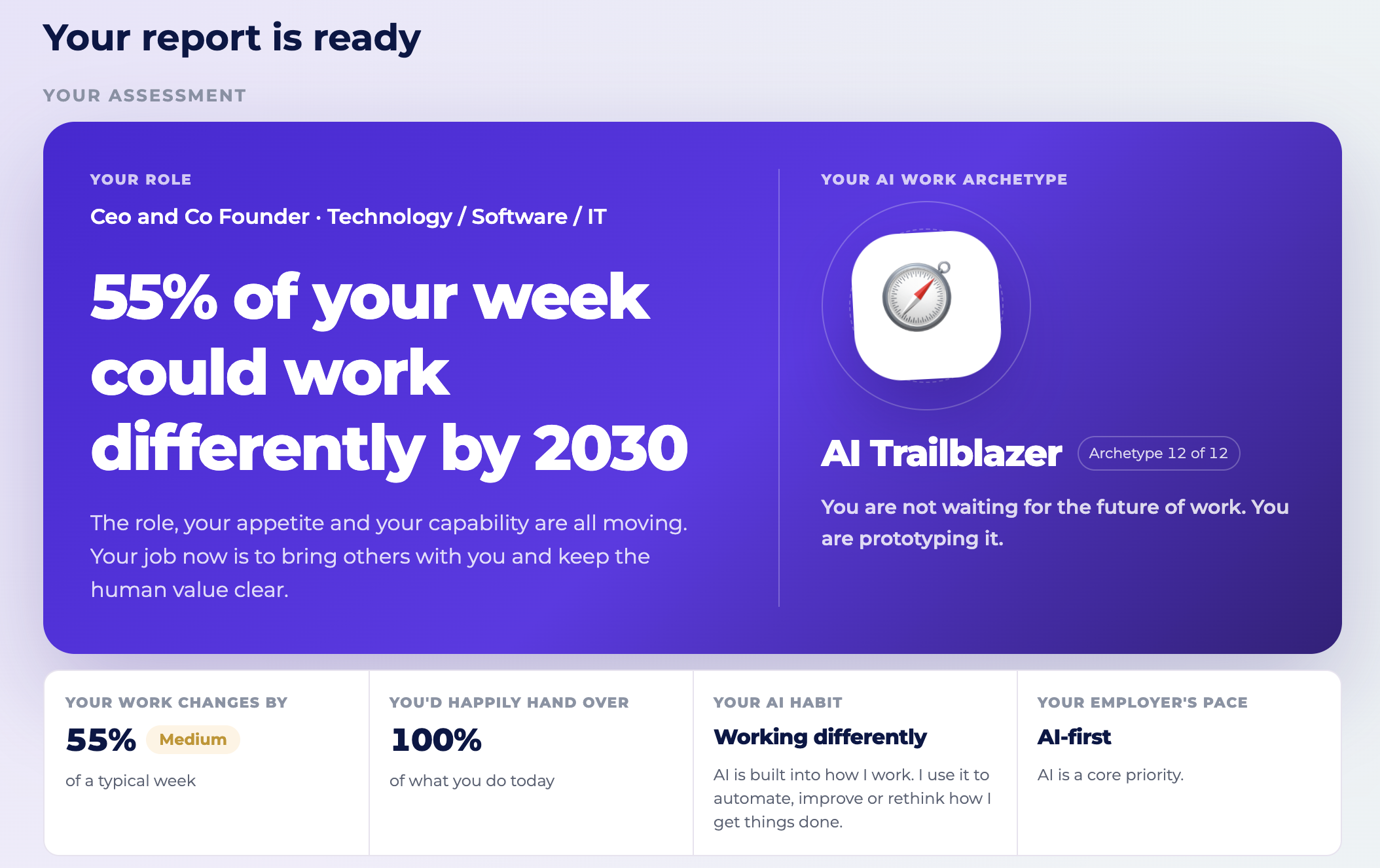
Your headline number, and what it actually means
The big number at the top of your report is the percentage of your working week that could work differently by 2030. That's the number that makes people stare at the screen for a minute, so let's be clear about what it means and what it doesn't.
Working differently can look several ways. AI might make you faster at a task, draft the first version while you review it, do most of the work while you provide judgement, eventually handle it end to end, or make the task disappear altogether. In most results, only a small slice lands in those last two categories.
Don't compare your percentage to someone else's and assume higher means worse. A high number usually means more of your week is opening up, not more of your job at risk. The question worth sitting with is: what's changing, and what would you want to do with that change?
Your AI work archetype
Everyone who runs the assessment gets one of 12 AI work archetypes. Your archetype reflects three things: how much your work could change, how much you'd happily hand over to AI, and how you're already using it day to day.
There's no good or bad archetype, and it isn't a ranking. Where it gets interesting is comparing yours with the people around you, because two people with the same job title can land in completely different spots.
The twelve, at a glance:
Whichever one you land on, treat it as a conversation starter.
The task breakdown, this is where it gets specific
Each task in your role sits in one of five states. Read these before you talk to anyone, because the difference between them matters:
The first two mean your role in that task isn't going anywhere. The third means your role shifts from doing the work to directing and checking it. The last two are worth sitting with, and they're not the same thing: fully automated still needs someone accountable for what comes out the other end, eliminated means there's nothing left to be accountable for. In most results, both are a small share of the total.
Look at where your time currently goes and where those tasks land. That's where the interesting conversation starts, not the headline number.
Your skills outlook, and the two sections most people skip
Three columns: Double Down, Develop New, and Let AI Handle.
Double Down is your foundation, skills that get more valuable as the routine work clears out. Develop New is where the future work is, capabilities worth building for where your role is heading, and they're not the kind you pick up in a single workshop. Let AI Handle is the permission slip: stop investing your development time there.
Don't stop at the skills columns. Two sections further down are easy to skim past and usually where the sharpest insight sits: Where your role is heading, which sketches the shape your job takes if change keeps moving at its current pace, and Your blind spots, which flags anywhere your instinct to keep control doesn't match what the data says AI can already do. If that section comes back empty, that's information too. It means your judgement about what to hand over is already tracking the forecast.
Before the conversation: three things to prepare
1. Know your "so what"
Your results are data. Data without interpretation doesn't land. Before you talk to anyone, decide what you think your results mean for your role, your team, your function. You don't need a fully formed view, just a starting point. Something like: "A good chunk of my week is shifting, most of it in the admin-heavy stuff, and the skills I need to build sit in AI collaboration and strategic judgement."
2. Pick the right moment
Whether your results feel urgent or not, this conversation deserves proper space. Don't bring it up at the end of a 1:1 when your manager has three other things on their mind. Book a specific conversation, even 20 minutes, and frame it as "I want to talk about something I've been thinking about regarding where my role is heading." That framing signals initiative, not anxiety, and it sets the tone before you've even started.
3. Bring an experiment, not just the data
Your report already gives you three moves ordered by effort: something small this week, something to test this month, something bigger to build toward this quarter. Pick one before the conversation. Showing up with an action beats showing up with only a chart. More on how to actually run one below.
How to frame the conversation
You don't need a presentation. You need a way in and a thread to follow.
The opener
Something simple works best. "I've been thinking about how AI is going to change my role and I ran an assessment that gave me some useful data. I wanted to talk through what it showed and get your take."
That's it. No drama, no anxiety spiral. Just curiosity and initiative, two things most managers respond well to.
Walking through your results
Start with the headline. "The assessment showed that about [X]% of my week could work differently by 2030. Most of that is in the [admin / analytical / operational] work, things like [specific examples from your task breakdown]."
Then bring in your archetype. "I came out as a [your archetype], which basically means [one-line description]. What's interesting is comparing that with where you'd place the rest of the team."
Then move to the skills picture. "What interested me most was the skills section. It flagged [Double Down skills] as things I should keep leaning into, and [Develop New skills] as things worth starting to build now. I hadn't thought much about [specific skill] before, but looking at how my tasks are shifting, it makes sense."
The question that opens the conversation
After you've walked through your results, ask something that invites your manager's perspective rather than just their reaction. A few options:
- "Does this match what you're seeing about how our function is changing?"
- "Are there things on the team that you think are shifting faster than this shows?"
- "Is there anything in the Develop New column you think would be particularly valuable given where the team is heading?"
- "If you ran this yourself, where do you think your archetype would land, and why do you think mine's different?"
These questions do two things. They make your manager a participant rather than an audience, and they start surfacing information about where the team's going that you probably don't have full visibility on.
Turn it into an experiment
You don't need an AI transformation plan. You need one experiment: try something, see what happens, and learn from it.
That's what the this week / this month / this quarter actions in your report are for, three moves ordered by effort, not one big commitment. Pick the smallest one that still tells you something real.
If you want a sharper version, take your single heaviest hand-over task, the one you'd most happily give to AI, and wire it fully end to end just once: let AI do the sourcing, the drafting, the scoring, whatever the task involves, with no manual steps in between. Then compare what it produced against what you'd have done yourself. That's how you find out how much to actually trust the pipeline, rather than guessing from the sidelines.
Bring the result of that one experiment into your next conversation. It's a much stronger opener than "I've been meaning to try this."
Moving from your role to the bigger question
If the conversation is going well, there's a natural next step worth raising.
Your results show one role. The same assessment can run across a whole team, and when multiple people compare results, the patterns that emerge are usually the ones worth bringing to leadership.
You can raise this simply: "I was thinking it might be worth doing this as a team, even just a 30-minute session where we all try it and compare notes. It would give us a much clearer picture of where we're exposed and where we should be investing." Or aim the question further out: "If this gave us back real capacity as a team, what would we actually want to do with it?"
This shifts the conversation from "here's my individual data" to "here's something we could do together," which is both more useful and more likely to get traction.
If your manager is interested, the GoFIGR crib sheet gives you everything you need to run a team session.
What a good outcome looks like
You're not trying to solve everything in one conversation. A good outcome is one of the following:
- Your manager has a clearer picture of how your role is shifting and what you're thinking about
- You've agreed on one or two skills worth prioritising in your development plan
- You've got the go-ahead to run your experiment and report back
- You've planted the seed for a team session if you think they might value this
- You've learned something about where the function is heading that you didn't know before
Any of these is a win. The goal isn't to have all the answers. It's to be the person in the room who brought the question.
What if the conversation doesn't go well?
Sometimes managers aren't ready for this conversation. They're in BAU, they're stretched, or AI feels abstract and distant to them.
If that happens, don't push. Leave the door open. "No worries, just something I've been thinking about, happy to revisit it when the timing's better."
And then keep building your own picture regardless. The skills in your Develop New column don't need your manager's permission to work on. The awareness you now have about how your role is shifting is yours, whether or not your organisation is ready to talk about it yet.
The people who'll navigate this well aren't necessarily the ones with the most senior managers or the most supportive organisations. They're the ones who looked clearly at what was coming and started preparing before they had to.
If you lead a team, read our guide on how to prepare your workforce for AI at an organisational level.
Ready to try the assessment? It takes a couple of minutes and you'll have your results instantly: app.gofigr.ai/impact-of-ai
Want to run this with your whole team? Download the GoFIGR team workshop crib sheet here: [crib sheet link]
If you're a manager or leader reading this
Individual results are useful. But when dozens or hundreds of people across your organisation take this assessment, patterns emerge: which functions are most exposed, where the skills gaps are, where you can redeploy people rather than let them go.
The organisations that get this right don't just avoid the difficult conversations. They find growth. The ones that get it wrong learn an expensive lesson about what AI can't replace.
We help organisations map this at scale: task-level analysis across whole functions, skills trajectory data, archetype distribution across teams, and enough clarity to walk into any leadership conversation with a point of view rather than a guess.
That growth starts with building an AI talent strategy that connects your workforce data to your business priorities.
If that's the conversation you need to have, let's talk.
FAQs
Is a higher percentage worse than a lower one?
No, a high number usually means more of your week is opening up for something else, not more of your job disappearing. Look at where your tasks land across the five states rather than the headline number alone. If most of your shifting tasks are in "you lead, AI assists" or "AI leads, you guide," you're still very much in the picture. The real question is whether you're steering that change or reacting to it and how you could use the capacity you free up to do something more interesting or impactful instead.
My percentage is on the lower side. Should I still worry?
Not worry, but stay alert. A low number today doesn't mean a low number in three years, the model is based on current AI capability and that's moving fast. The more useful response is to notice which parts of your role are growing in importance and lean into those deliberately. You're in a strong position. Use it to get stronger.
What's my AI work archetype, and does it actually matter?
It matters less as a label and more as a comparison point. Your archetype is built from three things: how much your work could change, how much you'd happily hand over, and how you're already using AI. The value isn't in the name you get. It's in noticing where your archetype differs from a colleague with a similar job, and asking why.
What's the difference between the free assessment and a full organisational version?
The free tool gives you a snapshot: a handful of tasks modelled against a generic AI adoption scenario. It's designed to get you started and spark a conversation.
A full organisational assessment goes much deeper. It maps every role across your function or organisation against your specific AI adoption scenario, not a generic one. It surfaces where exposure is concentrated, where the skills gaps sit, where you can redeploy people, where archetypes cluster by team, and where your L&D investment should actually be going. It's the difference between knowing roughly where you stand and having the data to make real decisions.
If that's what you need, find out more.
Can we get a custom version of this for our whole company?
Yes, and it's one of the most useful things we do. When you run this across a whole team or function, patterns emerge that no individual result can show you. Which roles are most exposed. Where the same job title hides very different task realities. Where your skills investment will have the most impact. Where you can create capacity rather than just cut cost.
We work with organisations globally to map AI impact at scale, from small People functions to large enterprise workforces. If you want to understand what this looks like for your organisation, get in touch.
How accurate is the assessment?
It analyses your role at the task level using current AI capability data and our methodology, which is grounded in an International Labour Organisation framework and extended significantly by the GoFIGR team. It's not a crystal ball. AI is evolving and no model can predict exactly what happens. But it's significantly more specific than the generic "X% of jobs at risk" headlines, because it looks at what you actually do, not just what you're called.
How often is the assessment updated?
We update the model regularly as AI capability evolves. The assessment reflects current AI capability, what tools can do today and what's on a credible near-term horizon. We're not modelling science fiction. We're modelling what's already technically possible or in active development, which is more than enough to be getting on with.
Is my data private?
Yes. Your results are yours, nobody else sees them. We don't share individual assessment results with employers, managers, or anyone else. The data we use to improve the model is aggregated and anonymised. If you have specific questions about how your data is handled, you can read our privacy policy here.
Can I share my results with my team?
Please do. The most valuable thing about this assessment isn't any individual result. It's what happens when people compare notes. Two people with the same job title often get quite different results and different archetypes, because the assessment looks at the actual task mix rather than the role label. That difference is usually the most interesting thing to talk about.

Helena Turpin spent 20 years in talent and HR innovation where she solved people-related problems using data and technology. She left corporate life to create GoFIGR where she helps mid-sized organizations to develop and retain their people by connecting employee skills and aspirations to internal opportunities like projects, mentorship and learning.
.jpg)

